Information about Fireside Dance Club
For All
1. What is Fireside Dance Club all about?
Fireside Dance Club is a social ballroom dance club
for couples and invited guests.
We host a dance on the second Friday of even numbered months.
We have a caterer served dinner with music provide by a live band.
We hold our dances at the Fireside Room in the Rossmoor Gateway Center.
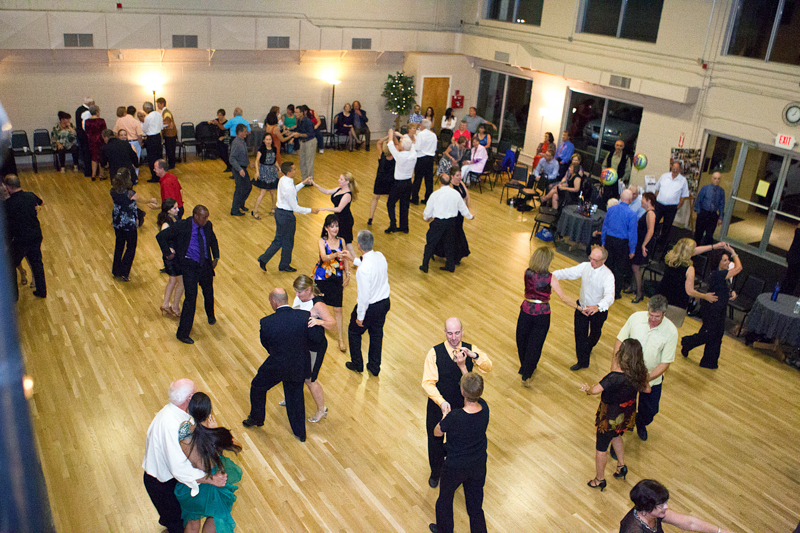
The venue provides a nice dance floor
and plenty of room to dance and to sit and socialize.
After dinner we enjoy 2 hours of dance music for a variety of couples oriented ballroom style dancing:
foxtrot, rumba, cha-cha, east coast swing, tango, samba,
waltz, Viennese waltz, west coast swing, night club two-step, and
every once in a while a hustle, quick step, bolero, merengue, or salsa.
2. What is the attire at the dances?
Our dances are semi-formal, coat and tie for men.
Women wear elegant tops and skirts, dresses, or nice pants suits.
Dance shoes with leather or felt bottoms are strongly recommended.
3. What is a typical dance like?
We enjoy a friendly and fun evening with elegant table decorations,
a caterer served dinner, a live band providing
music for dancing, and nice conversation with
existing and new friends.
Doors open at 6:00 PM with passed hors d'oeuvres and
no host bar. Dinner starts at 7:00 PM
and dinner and dance music runs from 7:00 until 9:30 PM and we are out of the venue by 10 PM.
There are sometimes brief announcements during the mid-evening
break to discuss club news and to welcome visitors.
4. Do I have to join the Fireside Dance Club as a couple?
Yes.
Only Rossmoor residents can join the club as members.
Your membership is for two seats and two meals for each dance.
Our definition of a couple is any two people who enjoy spending an evening together.
You may bring a different dance partner for each dance, but
you must pay for and attend dances as a dance couple.
For Guests
1. What is being a guest all about?
Guest couples invited by current members are always welcome.
Our only request is that guests read the FAQ section
What should we know about couples/ballroom dancing?
We will work with your hosts and get your name and email and give you the
opportunity to receive notifications about future events.
2. What should we know about couples/ballroom dancing?
The main differences between ballroom dancing and
typical club social dancing are:
- Both members of the couple are touching most of the time,
usually in a typical dance frame.
- In the couple partnership, the Lead (usually the man)
determines the direction and what steps the couple will take
and the Follow (usually the woman) interprets the Lead's
physical cues to embellish the steps with graceful movements to
give the traveling motion grace and beauty.
- Smooth (or Standard) dances such as
waltz, foxtrot, quickstep, tango, and Viennese waltz
are traveling dances, where couples
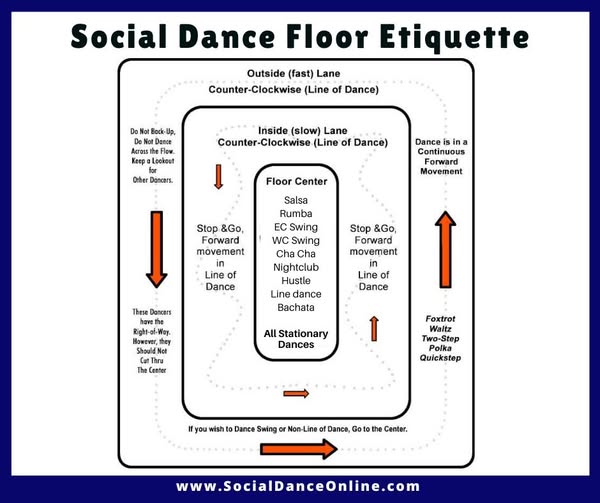
travel along the "line of dance" .
For these dances, we want to ensure people who
enjoy traveling fast can do so and those who do not all remain safe.
For these dances, the dance and safety etiquette is
to dance near the center if not traveling fast or at all.
Consider the dance floor as a multi-lane race track with dancers
in the outside lane traveling fast and those who want to travel
slower choosing the inner lanes staying closer to the center of the room.
It is courteous and helpful for everyone's safety that if you are
traveling slowly or not at all that you move towards the center or off of the dance floor.
Here is a nice visual summary of
social dance floor etiquette.
For Members
1. How do I log in?
Each member has an account that allows them to log in to the website once
they have set up their personal password.
Your first time using the website,
click on the Login link in the navigation bar and near the bottom left of the login screen
you will find a button at the bottom of the page labeled Forgot My Password.
Click that, enter your email in the form, and click on the Reset My Password button.
You will receive an email momentarily
(please check your spam or junk folder just in case)
with your login and a web link to reset your password.
Click on the web link in your email to add/set/reset your password. You will enter your new password twice and click at the bottom
on the button and your are all set.
Note: AOL and Comcast have pretty aggressive spam filters. If you
have a ...@aol.com or ...@comcast.net email
address, add the following contact to your contact list:
- Name: Fireside Dance Club
- Email: info@firesidedanceclub.org
If you suspect we do not have your current/correct email (your partner can log in and confirm via the Who utility)
or you did not get an email, please
send an email to the webmaster by clicking on the Webmaster link at the bottom of any web page
or fill out the feedback form and we will get your
email updated so you can reset your password.
2. What if I need help?
If you get lost on the website or don't know what to do....
- Don't Panic.
- First, click on the
logo in the upper left corner of any website page. This will bring
you to your "home page" with a concise summary of links to the
(few) most likely things you will need to be concerned about.
-
Most web pages have a (tiny) line at the top of the page with a link to
an Overview to give some perspective of what that part of the website
does and how to use it.
- In any form that has two columns with the
field attributes in the left (colored background) column and places to enter
information in the right column, each attribute name in the left column
is a link to a help function that will provide more information on what
that attribute means and reasonable ranges to add for a value for it.
The links usually provide hints if you merely hover your mouse over them.
-
You can fill out the feedback form to provide feedback or
to ask specific questions. We will work hard to place answers to your questions
that might have broader usage in our frequently asked questions.
3. How do I register for a dance?
The registration and seat selection process is similar to
how you normally join your friends at any large event or buy tickets
to a play or concert.
The first person to register chooses a table and lets you
know where to join them or when you find where your friends
are seated, you can change your seat to join them.
- See the current seating arrangements and availability.
- Select the table where you want to sit. If you are registering via postal mail,
enter that number on your form. Early submittees get preference. If you
are registering online, do the following.
- Login
- Through the Attendance navigation bar link
click the Register button.
(or click on the Register and make table selection
for us for the upcoming dance. link from your home page after you log in).
-
Fill out the registration form:
- Select the table where you wish to sit.
- Select your method of payment.
-
Click on the Register Us button at the bottom.
You will receive an email notification with the details of the dance
and who is sitting at your table when you registered. You can forward
this email to your friends and they can register selecting the same
table so you can sit together.
After registration, you can change your table
at the Seating navigation bar link
On any table that has room for you (and your guests).
Click the link Move Us Here and you will be reseated at that table.
Detailed registration and seat changing instructions are visible
at the FAQ navigation bar link once you log in.
Follow the above instructions for setting up your password and
once logged in you will see all the instructions you need.
If you have further questions, fill out the feedback form.
4. How do I look at photos taken at our dances?
After logging in, click on the Photos link
in the dark background navigation bar at the top of the page. It will display
a list of past
dance events. In the first column of each line (heading Options) you will see several round icons.
All events with photos will have a yellow icon in that column and if you click it you will see a photo album of the event.
Alternatively, on the home page that you see when you log in (that you can
return to by clicking on the upper left logo image), the lower paragraph
under the header Photos, Website Admin, and Non-Dancing Stuff,
you can click on the first link, See
photos from past events. to see the same display.
|